ELWAVE Data Connection: How to Connect the TAI-PAN Data Feed
Connecting TAI-PAN to ELWAVE Pro: Step-by-Step Setup Guide
TAI-PAN supplies ELWAVE Pro with real-time prices and historical market data for precise Elliott Wave analysis. The connection is set up in just a few clicks – this guide shows you how.
What is ELWAVE Pro – and why does it need a data feed?
ELWAVE Pro is a professional charting and analysis platform specialised in the automatic identification and counting of Elliott Waves. The software analyses price patterns, recognises wave structures according to Elliott Wave theory and generates price scenarios and forecasts.
To carry out its analyses, ELWAVE Pro needs a reliable source of current and historical price data – the data feed.
TAI-PAN by Lenz + Partner is one of the proven data feed providers for ELWAVE Pro – used by analysts and traders as a reliable data source for decades. You can find the full range of available feeds on the ELWAVE data feeds page.
TAI-PAN – the data feed for ELWAVE Pro
Lenz + Partner provides a direct data feed integration for ELWAVE Pro. The connection is set up right when ELWAVE starts – no middleware or additional software required.
What makes TAI-PAN stand out as an ELWAVE data feed:
- Direct connection at ELWAVE launch – enter username and password, click Connect
- Real-time prices for stocks, indices, futures, forex, commodities and crypto
- Historical data – period data since 2002, tick data for up to 3 years
- COT reports (Commitments of Traders) as time series
- Economic data (economic expectations, leading indicators)
- MSCI indices, warrants & certificates
- German-speaking support, provider based in Germany
- Trial from €1, cancel monthly
Setup guide: connecting TAI-PAN to ELWAVE Pro
The setup is straightforward and can be completed in just a few clicks. Please have your TAI-PAN login credentials ready – username (customer number) and password – which you received from us via email.
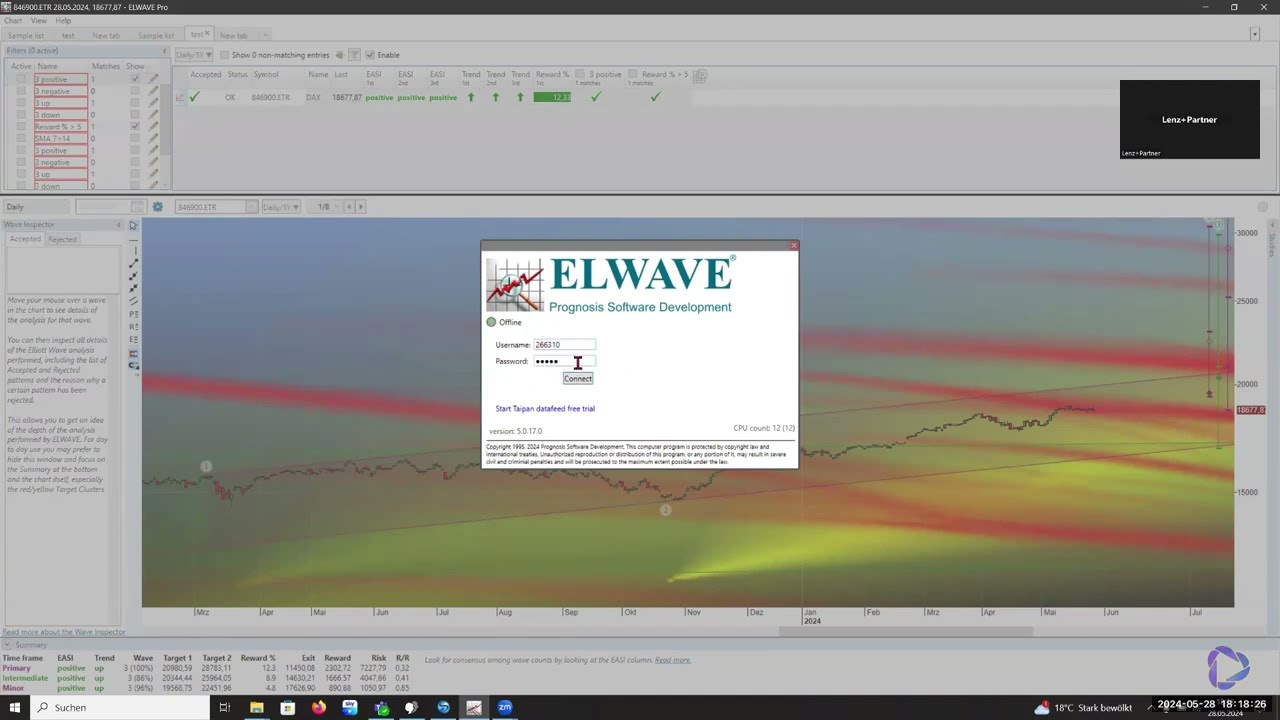
Start ELWAVE Pro and enter your login credentials
Start ELWAVE Pro. The login window for the data feed appears automatically. Enter your TAI-PAN login credentials:
- Username: Your TAI-PAN username – received from us via email
- Password: The password you set yourself during registration
You can also find your credentials at any time in the TAI-PAN customer portal.
Establish the connection – click Connect
Click Connect. ELWAVE Pro establishes the connection to the TAI-PAN data feed.
In the Sample List you will immediately see that current prices and history are available. Via Symbol Search you can search for any security – the data is available immediately after selection for your Elliott Wave analysis.
Select a security and start your analysis
Click on any instrument in the Sample List or via Symbol Search – ELWAVE Pro loads real-time prices and historical data and begins the automatic Elliott Wave count immediately.
If you have changed your password or need to re-enter your credentials, follow these steps in ELWAVE:
- Click the Data Provider Settings button.
- Select Disconnect to close the existing connection.
- Enter the new username or password and click Connect again.
Note: If the username or password is incorrect, ELWAVE will display an error message immediately – the fields can then be corrected directly.
Available data feeds for ELWAVE Pro at a glance
TAI-PAN offers a wide range of data feeds for ELWAVE Pro – from an affordable entry-level feed to specialised real-time packages for individual exchanges. The full overview with order links is available at tai-pan.de/en/elwave-datafeeds.
Global Data Feed
Real-time: Tradegate, Lang&Schwarz, CBOE Europe, index indications, forex, commodities, cryptocurrencies, warrants & certificates
Delayed included: NYSE, NASDAQ, futures, German regional exchanges, European and Asian exchanges
For deep backtests & Elliott Wave counts
- Tick data 3 years – €39/month
- Period data 5 years – €19/month
- Period data since 2002 – €39/month
- Tick data since 2002 – upon request
Long histories are particularly important for Elliott Wave analysis – the more wave patterns the software can recognise in the past, the more precise the count.
Further real-time feeds by exchange
In addition to the Global Data Feed, individual real-time packages are available for specific markets:
US Stock Markets
NASDAQ, NYSE, NYSE American, OTC, CBOE US – real-time Level 1
US Futures
CME Group incl. CBOT, NYMEX, COMEX and OPRA – real-time Level 1
US Indices
Dow Jones, S&P 500, NASDAQ – real-time Level 1
Euronext
Stocks, futures, options, indices – real-time Level 2
Economic Data
Economic expectations, incoming orders, leading indicators
Additional individual feeds for London (€19), Madrid (€9), Borsa Italiana (€9), SIX Swiss Exchange (€19), Vienna (€5), Toronto (€25), ICE US/Europe/Canada and MSCI indices are available at tai-pan.de/en/elwave-datafeeds. A data feed comparison helps you choose the right package.
Why Elliott Wave analysis needs high-quality data
Elliott Wave analysis is based on the precise evaluation of price patterns – wave structure, amplitude and duration. Errors or gaps in the data distort the wave count and lead to incorrect scenarios.
- Missing price points distort wave counts
- Gaps in history prevent complete pattern analysis
- Delayed prices show the wrong current wave position
- Price targets and forecasts become unreliable
- Seamless, consistent price series for precise wave counts
- Long histories since 2002 – all waves fully visible
- Real-time prices for the current wave position
- Verified data quality from direct exchange sources
Frequently asked questions about TAI-PAN and ELWAVE Pro
Which data feed providers does ELWAVE Pro support?
ELWAVE Pro supports TAI-PAN by Lenz + Partner as a data feed provider for real-time and historical market data. The connection is set up directly when ELWAVE Pro launches via the login window.
How do I connect TAI-PAN to ELWAVE Pro?
ELWAVE Pro automatically opens the login window at launch. Enter your TAI-PAN username (customer number) and password, then click Connect. The connection is established immediately.
Where do I find my TAI-PAN username?
Your username (customer number) is sent to you by email from Lenz + Partner upon registration. You can also find it at any time in the TAI-PAN customer portal. The password was set by you during registration.
Can I try TAI-PAN for ELWAVE Pro before subscribing?
Yes. The Global Data Feed – the recommended entry-level feed for ELWAVE – can be tested from €1, cancellable monthly with no minimum contract. Simply register at lp-software.com.
What historical data is available for Elliott Wave analysis?
TAI-PAN offers period data since 2002 (€39/month), period data for 5 years (€19/month) and tick data for 3 years (€39/month). Tick data since 2002 is available upon request. Long histories are especially important for complete Elliott Wave counts across multiple wave degrees.
What should I do if the connection cannot be established?
ELWAVE displays an immediate error message if the username or password is incorrect. Click Data Provider Settings → Disconnect, correct the credentials and reconnect. You can check the current server status at lp-software.com/status.
What does the TAI-PAN data feed for ELWAVE Pro cost?
The Global Data Feed costs €29/month (Level 1) and already covers a broad selection of markets. Individual real-time packages for specific exchanges start from €5/month. A full price overview is available at tai-pan.de/en/elwave-datafeeds and on the market data pricing page.
Connect TAI-PAN to ELWAVE Pro
Real-time prices and historical market data for precise Elliott Wave analysis. Global Data Feed from €1 trial, cancel monthly.
Try for €1 ›